Python 动态模块外部通信方法
本案例演示如何在工作流中通过 Python 动态模块将识别结果可靠地推送到外部系统,涵盖 HTTP 与 WebSocket 两类常见通信方式。
组成与流程
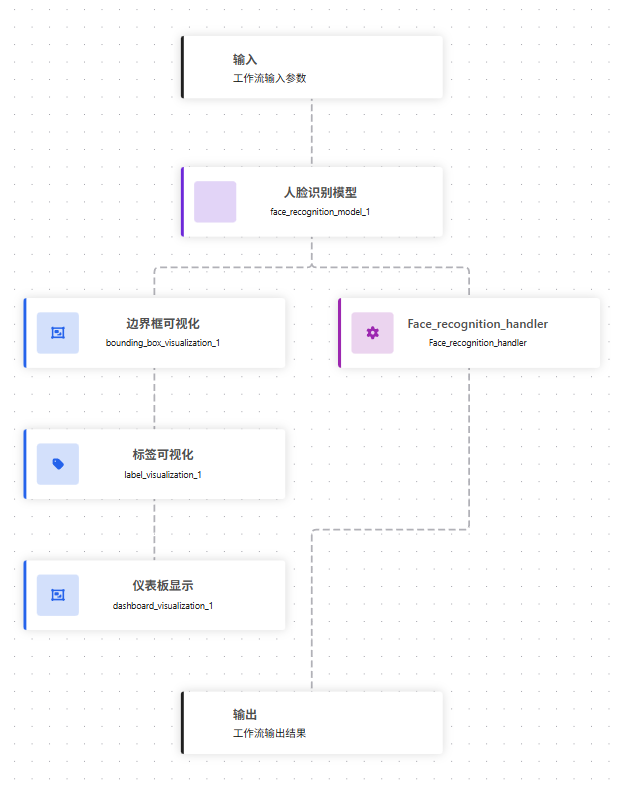
人脸识别模块:运行,输出人脸预测与身份信息(含 unknown 判定)。
边界框可视化:绘制检测框以便查看识别位置。
标签可视化:在图像上叠加类别标签(身份名称)。
仪表盘展示:将可视化图像推送到仪表盘页面。
自定义 Python 模块:整理身份识别结果,构造消息并向外部服务 url 发送 HTTP POST;返回状态码与调试信息。
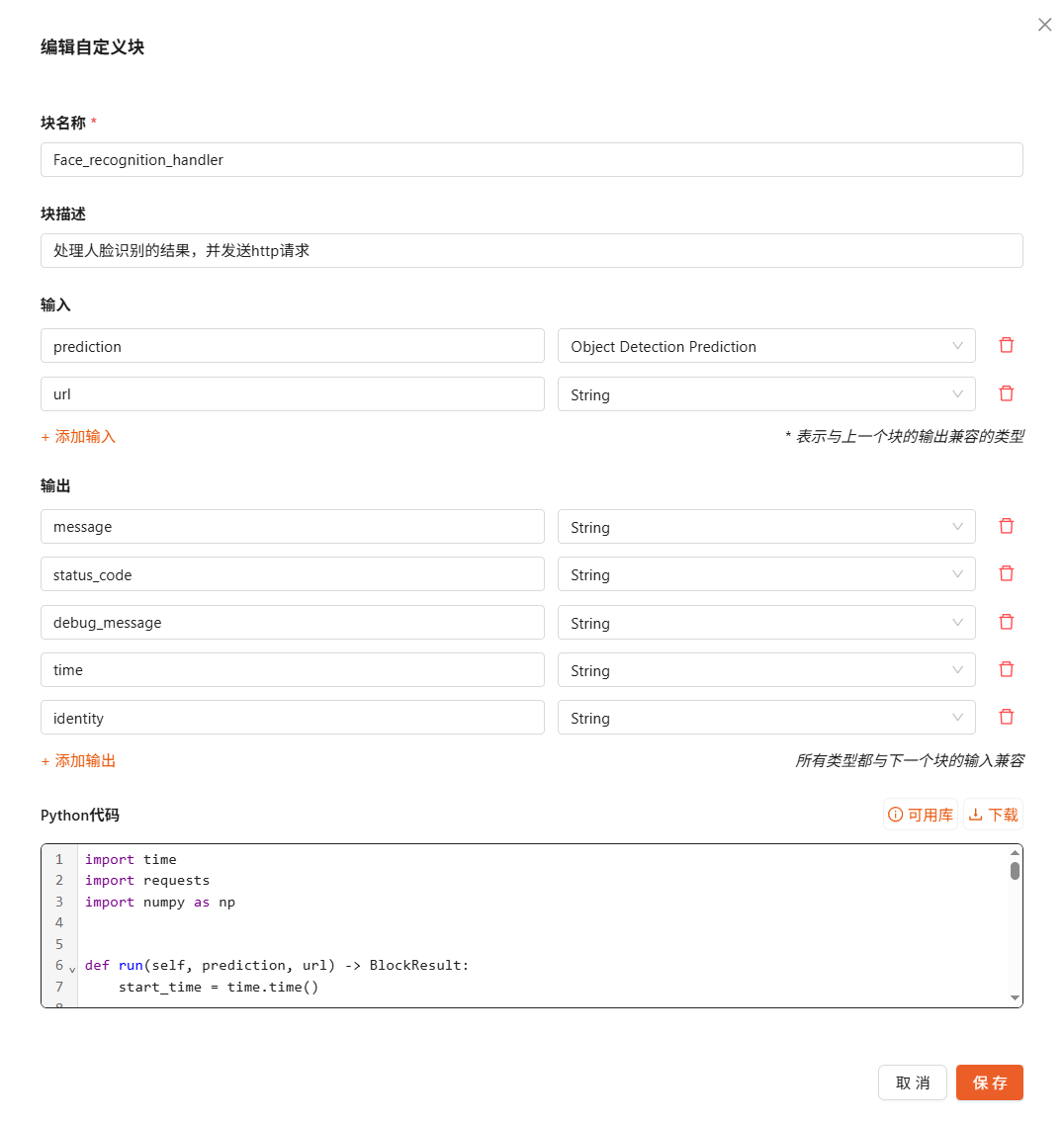
工作流定义
查看工作流 JSON
  1{
  2  "version": "1.0",
  3  "inputs": [
  4    {
  5      "type": "WorkflowImage",
  6      "name": "image"
  7    }
  8  ],
  9  "steps": [
 10    {
 11      "type": "daoai/face_recognition_model@v1",
 12      "name": "face_recognition_model_1",
 13      "comments": null,
 14      "images": "$inputs.image",
 15      "max_faces": 10,
 16      "similarity_threshold": 0.5,
 17      "regions": null
 18    },
 19    {
 20      "type": "core/bounding_box_visualization@v1",
 21      "name": "bounding_box_visualization_1",
 22      "comments": null,
 23      "image": "$inputs.image",
 24      "copy_image": true,
 25      "predictions": "$steps.face_recognition_model_1.predictions",
 26      "color_palette": "DEFAULT",
 27      "palette_size": 10,
 28      "custom_colors": [],
 29      "color_axis": "CLASS",
 30      "thickness": 2,
 31      "roundness": 0
 32    },
 33    {
 34      "type": "core/label_visualization@v1",
 35      "name": "label_visualization_1",
 36      "comments": null,
 37      "image": "$steps.bounding_box_visualization_1.image",
 38      "copy_image": true,
 39      "predictions": "$steps.face_recognition_model_1.predictions",
 40      "color_palette": "DEFAULT",
 41      "palette_size": 10,
 42      "custom_colors": [],
 43      "color_axis": "CLASS",
 44      "text": "Class",
 45      "text_position": "TOP_LEFT",
 46      "text_color": "WHITE",
 47      "text_scale": 1,
 48      "text_thickness": 1,
 49      "text_padding": 10,
 50      "border_radius": 0
 51    },
 52    {
 53      "type": "daoai/dashboard_visualization@v1",
 54      "name": "dashboard_visualization_1",
 55      "comments": null,
 56      "image": "$steps.label_visualization_1.image"
 57    },
 58    {
 59      "type": "Face_recognition_handler",
 60      "name": "Face_recognition_handler",
 61      "url": "http://127.0.0.1:9000",
 62      "prediction": "$steps.face_recognition_model_1.predictions"
 63    }
 64  ],
 65  "outputs": [
 66    {
 67      "type": "JsonField",
 68      "name": "face_recognition_model_1_1",
 69      "coordinates_system": "own",
 70      "selector": "$steps.face_recognition_model_1.predictions"
 71    },
 72    {
 73      "type": "JsonField",
 74      "name": "bounding_box_visualization_1_1",
 75      "coordinates_system": "own",
 76      "selector": "$steps.bounding_box_visualization_1.image"
 77    },
 78    {
 79      "type": "JsonField",
 80      "name": "label_visualization_1_1",
 81      "coordinates_system": "own",
 82      "selector": "$steps.label_visualization_1.image"
 83    },
 84    {
 85      "type": "JsonField",
 86      "name": "message",
 87      "coordinates_system": "own",
 88      "selector": "$steps.Face_recognition_handler.message"
 89    },
 90    {
 91      "type": "JsonField",
 92      "name": "status_code",
 93      "coordinates_system": "own",
 94      "selector": "$steps.Face_recognition_handler.status_code"
 95    },
 96    {
 97      "type": "JsonField",
 98      "name": "debug_message",
 99      "coordinates_system": "own",
100      "selector": "$steps.Face_recognition_handler.debug_message"
101    }
102  ],
103  "dynamic_blocks_definitions": [
104    {
105      "type": "DynamicBlockDefinition",
106      "manifest": {
107        "type": "ManifestDescription",
108        "description": "处理人脸识别的结果,并发送http请求",
109        "block_type": "Face_recognition_handler",
110        "inputs": {
111          "prediction": {
112            "type": "DynamicInputDefinition",
113            "selector_types": [
114              "input_parameter",
115              "step_output"
116            ],
117            "selector_data_kind": {
118              "input_parameter": [
119                "object_detection_prediction"
120              ],
121              "step_output": [
122                "object_detection_prediction"
123              ]
124            }
125          },
126          "url": {
127            "type": "DynamicInputDefinition",
128            "selector_types": [
129              "input_parameter",
130              "step_output"
131            ],
132            "selector_data_kind": {
133              "input_parameter": [
134                "string"
135              ],
136              "step_output": [
137                "string"
138              ]
139            },
140            "value_types": [
141              "string"
142            ]
143          }
144        },
145        "outputs": {
146          "message": {
147            "type": "DynamicOutputDefinition",
148            "kind": [
149              "string"
150            ]
151          },
152          "status_code": {
153            "type": "DynamicOutputDefinition",
154            "kind": [
155              "string"
156            ]
157          },
158          "debug_message": {
159            "type": "DynamicOutputDefinition",
160            "kind": [
161              "string"
162            ]
163          },
164          "time": {
165            "type": "DynamicOutputDefinition",
166            "kind": [
167              "string"
168            ]
169          },
170          "identity": {
171            "type": "DynamicOutputDefinition",
172            "kind": [
173              "string"
174            ]
175          }
176        }
177      },
178      "code": {
179        "type": "PythonCode",
180        "run_function_code": "import time\nimport requests\nimport numpy as np\n\n\ndef run(self, prediction, url) -> BlockResult:\n    start_time = time.time()\n\n    try:\n        # class_name 是 array-like(numpy / pandas)\n        class_names = prediction.data['class_name']\n\n        message = \"未检测到人员\"\n        identity = \"\"\n\n        if class_names is not None and len(class_names) > 0:\n            # 转成字符串列表,防止 numpy 类型问题\n            class_list = [str(c) for c in class_names]\n\n            if np.any(np.char.lower(class_names.astype(str)) == \"unknown\"):\n                message = \"未在身份库中匹配到对应人员\"\n                identity = \"unknown\"\n            else:\n                unique_people = sorted(set(class_list))\n                identity = \", \".join(unique_people)\n                message = f\"识别到人员:{identity}\"\n\n        payload = {\n            \"message\": message,\n            \"timestamp\": int(time.time())\n        }\n\n        response = requests.post(\n            url,\n            json=payload,\n            timeout=5\n        )\n\n        return {\n            \"message\": message,\n            \"identity\": identity,          # ✅ 按你要求加在 return 里\n            \"status_code\": response.status_code,\n            \"debug_message\": response.text,\n            \"time\": round(time.time() - start_time, 3)\n        }\n\n    except Exception as e:\n        return {\n            \"message\": None,\n            \"identity\": \"\",\n            \"status_code\": -1,\n            \"debug_message\": str(e),\n            \"time\": round(time.time() - start_time, 3)\n        }\n"
181      }
182    }
183  ]
184}
外部通信示例
下面给出两种常见通信方式的参考实现,可直接复制到 Python 动态模块中使用。请根据实际需求修改目标 url 地址与消息内容格式。
HTTP 通信
示例:使用 HTTP POST 发送当前时间戳。
import time
import requests


def run(self) -> BlockResult:
    url = "http://127.0.0.1:8000/event"  # 按需修改

    payload = {
        "timestamp": int(time.time() * 1000)
    }

    try:
        response = requests.post(url, json=payload, timeout=5)

        return {
            "message": f"sent timestamp_ms {payload['timestamp']}",
            "status_code": response.status_code
        }

    except Exception as e:
        return {
            "message": str(e),
            "status_code": -1
        }
WebSocket 通信
使用原生库实现的最小 WebSocket 客户端,同样以发送当前时间戳为例。
import os
import ssl
import time
import json
import base64
import socket
import hashlib
from urllib.parse import urlparse


def _ws_send_text_once(ws_url: str, text: str, timeout: float = 5.0) -> None:
    u = urlparse(ws_url)
    if u.scheme not in ("ws", "wss"):
        raise ValueError(f"Unsupported scheme: {u.scheme}")

    host = u.hostname
    port = u.port or (443 if u.scheme == "wss" else 80)
    path = u.path or "/"
    if u.query:
        path += "?" + u.query

    # 1) TCP connect (+ TLS if wss)
    sock = socket.create_connection((host, port), timeout=timeout)
    if u.scheme == "wss":
        ctx = ssl.create_default_context()
        sock = ctx.wrap_socket(sock, server_hostname=host)

    try:
        # 2) WebSocket handshake
        key = base64.b64encode(os.urandom(16)).decode("ascii")
        req = (
            f"GET {path} HTTP/1.1\r\n"
            f"Host: {host}:{port}\r\n"
            f"Upgrade: websocket\r\n"
            f"Connection: Upgrade\r\n"
            f"Sec-WebSocket-Key: {key}\r\n"
            f"Sec-WebSocket-Version: 13\r\n"
            f"\r\n"
        )
        sock.sendall(req.encode("utf-8"))

        # Read handshake response headers
        buf = b""
        while b"\r\n\r\n" not in buf:
            chunk = sock.recv(4096)
            if not chunk:
                raise RuntimeError("Handshake failed: connection closed")
            buf += chunk

        header_blob = buf.split(b"\r\n\r\n", 1)[0].decode("iso-8859-1")
        lines = header_blob.split("\r\n")
        status_line = lines[0]
        if " 101 " not in status_line:
            raise RuntimeError(f"Handshake failed: {status_line}")

        headers = {}
        for line in lines[1:]:
            if ":" in line:
                k, v = line.split(":", 1)
                headers[k.strip().lower()] = v.strip()

        accept = headers.get("sec-websocket-accept")
        if not accept:
            raise RuntimeError("Handshake failed: missing Sec-WebSocket-Accept")

        magic = "258EAFA5-E914-47DA-95CA-C5AB0DC85B11"
        expected = base64.b64encode(hashlib.sha1((key + magic).encode("ascii")).digest()).decode("ascii")
        if accept != expected:
            raise RuntimeError("Handshake failed: bad Sec-WebSocket-Accept")

        # 3) Send a single masked text frame
        payload = text.encode("utf-8")
        if len(payload) > 125:
            raise ValueError("This minimal client supports payload length <= 125 bytes")

        fin_opcode = 0x81  # FIN=1, opcode=1(text)
        mask_bit_len = 0x80 | len(payload)  # MASK=1 + payload len
        mask_key = os.urandom(4)
        masked = bytes(b ^ mask_key[i % 4] for i, b in enumerate(payload))

        frame = bytes([fin_opcode, mask_bit_len]) + mask_key + masked
        sock.sendall(frame)

    finally:
        try:
            sock.close()
        except Exception:
            pass


def run(self) -> BlockResult:
    ws_url = "ws://127.0.0.1:8000/ws"  # 按需改
    try:
        # 毫秒级时间戳
        ts_ms = int(time.time() * 1000)

        _ws_send_text_once(ws_url, str(ts_ms), timeout=5.0)

        return {
            "status_code": 0,
            "message": f"sent timestamp_ms {ts_ms}"
        }

    except Exception as e:
        return {
            "status_code": -1,
            "message": str(e)
        }